
Most modern applications are built on top of hundreds of third-party packages. Every time you run npm install, yarn add or dotnet add package, you're pulling someone else's code directly into your production environment.
This means your application is only as secure, stable, and trustworthy as the dependencies you choose. The recent NPM worm incident was a perfect example: a single compromised package rapidly infected thousands of downstream projects.
Choosing the right dependencies, and maintaining them properly, is one of the most important things you can do before an exploit hits the ecosystem.
Why do we need packages?
The reason packages exist is simple, no team should be reinventing everything from scratch. They let you stand on the shoulders of people who've already solved problems.
Developers rely on packages to:
- Save time (and cost) - avoiding re-inventing the wheel
- Increase reliability - popular packages are usually more thoroughly tested than internal equivalents
- Leverage expertise - certain workflows or features are complex (and hence costly to build), relying on specialists leads to safer outcomes
- Stay consistent - shared packages help teams standardise patterns and reduce fragmented code
Learning the risks of using external packages
Video: The NPM Worm of November 2025 (7 min)While packages help teams move faster, they also introduce real and often underestimated risks. Every dependency added to your project is a new entry point for bugs, vulnerabilities or supply-chain attacks.
⚠️ Some of these key risks include:
- Hidden vulnerabilities - a dependency may contain unsecured code paths you never see
- Maintainer abandonment - many packages have a single maintainer who may burn out, disappear, or simply stop maintaining it
- Malicious updates - compromised maintainer accounts can ship harmful code without you knowing
- Stagnant libraries - a package with no updates for years becomes increasingly incompatible and insecure
The biggest risk with bringing in external packages is that you usually don't review the code you're pulling in. Yet it is still allowed to execute with the same permissions and privileges as the rest of your application.
Picking the correct package
Choosing the correct package is about more than just finding the one that works, it's about selecting dependencies you can trust, maintain and confidently ship to production. A good dependency should show clear signs of life, healthy governance, and predictable maintenance.
Before installing or adding a package to a project, developers should consider the following:
1. Is it actively maintained?
A package should be actively maintained, without this code quickly becomes incompatible, insecure and outdated. Packages that evolve with the greater ecosystem are more likely to curb security vulnerabilities and remain compatible with your solutions. The moment a security flaw is discovered and no-one is actively patching it, you inherit the maintenance burden.
When checking maintenance activity, look for:
- Recent commits
- Recent releases
- Responsiveness to issues and PRs


2. Is it maintained by somebody credible?
Packages produced by reputable individuals or organisations tend to follow better development practices, have formal processes for handling disclosures, and respond quickly to breaking issues.
Look for:
- A team or organisation behind the package (not a single anonymous dev)
- A clear contributor history (See TinaCMS' Contributor Graph)
- Governance you can rely on (Microsoft, Vercel, AWS)
- A clear communication channel when issues arise
3. Is it well documented?
A well documented package is a strong indicator of maturity, professionalism and long-term maintanability. Good documentation shows that the maintainers care about the developer experience and understand how their package is used in real-world applications.
4. Is it popular? (with context)
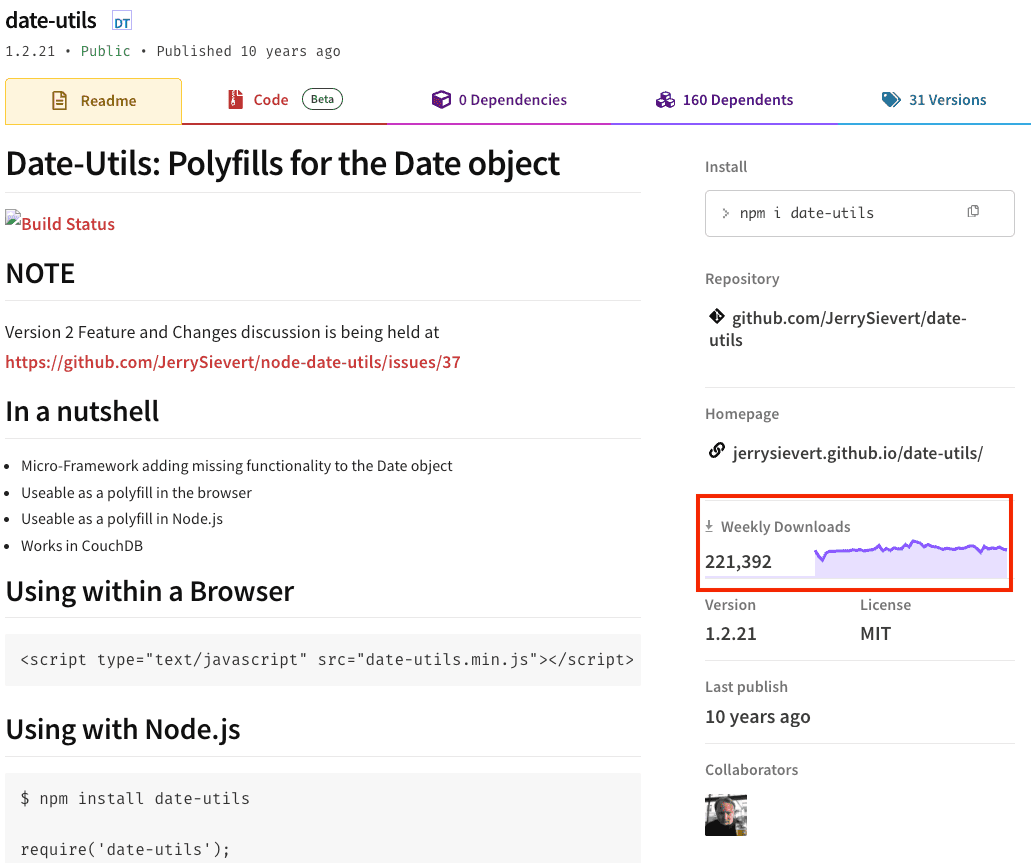
Popularity isn't a guarantee of quality, but it is a signal of real-world usage, maturity, and testing. A widely used package is more likely to be:
- Battle tested
- Scrutinised by more developers
- Supported by community knowledge
- Faster to resolve packages

5. Is it frequently released?
Healthy packages ship predictable updates. Regular releases indicate active stewardship and highlight:
- Improvements over time
- Security patches are delivered quickly
- Compatibility with new versions of core frameworks


6. Does it have good transparency?
A good package should be open and reviewable, transparency allows for:
- Inspection of source code
- A clear version history
- Readable changelogs
- Public issue discussions
Being able to review how a package works allows developers to evaluate its safety. Closed or opaque packages prevent verification, hide risky behaviour and make debugging significantly harder.
7. What are the bundle characteristics?
A single tiny package might introduce dozens of transitive dependencies, each new dependency carries:
- More code to review
- More maintainers to trust
- More vulnerabilities to track
Most importantly, risk compounds. A package might look harmless but its dependency chain may be spiraling and fragile.
JavaScript projects
Modern JavaScript applications are heavily influenced by dependency size. Tools like:
- BundlePhobia - shows minified and gzipped sizes
- BundleJs - shows bundle size and tree-shaking behaviour in different bundlers
These tools help you estimate the cost of adding a new library to your bundle.
Tree-shaking is another important factor. It removes unused exports from a package during build time, reducing shipped code. Unfortunately, there's still no universal way to know whether a library tree-shakes correctly, you generally need to:
- Read the documentation to verify ESM support
- Test the library in tools like BundleJS or your own build pipeline
- Check whether the package has side effects that may prevent shaking
Even today, the only reliable method is real-world experimentation.
.NET projects
Unlike JavaScript, .NET doesn’t have ecosystem tools that report the “bundle size” impact of installing a NuGet package. You can inspect IL size or dependency graphs, but there is no direct BundlePhobia-style analyser.
To reduce the final application size, .NET provides a built-in feature called the Trimmer (ILLink). Trimming removes unused code from your published output and can significantly shrink deployments. However, trimming must be used carefully—apps that rely on reflection, dynamic activation, or certain serializers may require additional annotations to avoid breaking behaviour.
Trimmer support has improved in .NET 8 and .NET 9, but the same rule still applies: understand your dependencies before enabling trimming in production builds.
8. Is it aligned with your license and legal considerations?
Licenses define what you can and cannot do with the code. Legal issues can emerge years after the code is shipped. Using restrictive or unclear licenses can put your organisation at risk, especially in commercial or closed-source products. The safest time to avoid licensing issues is before you install the dependency.

Documenting dependencies the right way
Have a 2nd pair of eyes
Lastly before deciding to install the library, check with another developer that is experienced in the scope of your project (e.g. look for a senior JavaScript developer's opinion if the project is an Angular project). Having a 2nd qualified person to agree with your decision is a good indicator that you are picking a good library
Document the decision
Always keep track of the reasoning when developers decided to go with a particular library instead of another one. This helps future developers working on a project to maintain the project.
Future developers will have better context and will be able to make a better decision should there be any situational or business requirement changes. A package audit log is a great way to record all the decisions.

Maintaining dependencies the right way
Choosing a good package is only half the job, maintaining them is an ongoing responsibility. Dependencies evolve constantly; new features are added, security patches are released, breaking changes appear, and ecosystem standards shift.
